



What EV Chargers Work with Intelligent Octopus Go? 2026 Guide
The EV chargers available from LAMPS with confirmed Intelligent Octopus Go compatibility include the Ohme Home Pro and ePod, myenergi zappi range, Hypervolt Home 3 Pro, Sync Energy Wall Charger 2 and compatible Andersen Quartz and A3 models. Some other chargers can also be used where Octopus connects directly to a supported vehicle instead, but a fixed charging schedule alone is not the same as full Intelligent Octopus Go integration.
Last updated: 22 June 2026. Charger compatibility and tariff rules were checked against current Octopus Energy and manufacturer guidance.
The right charger depends on more than tariff compatibility. Buyers should also consider tethered or socketed operation, cable length, single-phase or three-phase supply, connectivity, solar PV, home battery behaviour and where the charger will be positioned.
This guide compares the strongest Intelligent Octopus Go options sold by LAMPS and explains the difference between charger integration, vehicle integration and ordinary scheduled charging.
Which chargers work with Intelligent Octopus Go?
The following charger families have current evidence of direct or manufacturer-confirmed Intelligent Octopus Go support:
- Ohme Home Pro and Ohme ePod
- myenergi zappi and zappi GLO
- Hypervolt Home 3 Pro
- Sync Energy Wall Charger 2
- Andersen Quartz and Andersen A3
Compatibility is model-specific and can change through software updates or tariff policy. Before ordering, enter the exact vehicle and charger model into the current Octopus Energy eligibility checker. Do not assume that every model from a supported brand is compatible.
| Charger range | Intelligent Octopus Go route | Power and format | Practical reason to choose it |
|---|---|---|---|
| Ohme Home Pro and ePod | Direct charger connection through Octopus; schedules managed in the Ohme app | 7.4kW; tethered Home Pro or socketed ePod | Tariff-led charging with a choice between fixed cable and Type 2 socket |
| myenergi zappi | Direct charger connection through the Octopus app | 7kW single-phase or 22kW three-phase; tethered and untethered options | Flexible phase, cable and solar-control options |
| myenergi zappi GLO | myenergi confirms Octopus Intelligent compatibility; check the exact model in the Octopus app | 7kW single-phase; 6.5m tethered cable | Compact, app-controlled unit with RFID access |
| Hypervolt Home 3 Pro | Direct charger connection through the Octopus app | 7.4kW single-phase; tethered with 5m, 7.5m or 10m cable | Long cable choices and home battery-aware operating modes |
| Sync Energy Wall Charger 2 | Direct charger connection through the Octopus app | 7.4kW single-phase; tethered or socketed | Suitable where the wider Sync Energy ecosystem is being specified |
| Andersen Quartz | Direct Intelligent Octopus Go integration | 7kW or 22kW; tethered or socketed | Design options, cable choices and a three-phase version |
| Andersen A3 | Confirmed compatible Andersen model | 7kW single-phase; tethered | Customisable front panel with concealed cable storage |
Important: the Andersen A2 22kW is not currently compatible with Intelligent Octopus Go. The 7kW A2 may be supported, but its age and exact model need to be checked before relying on charger-level integration.
What does “compatible” actually mean?
There are three different ways an EV charger may be described as working with Intelligent Octopus Go. They are not interchangeable.
1. Direct charger integration
Direct integration means Octopus connects to the charger through the manufacturer’s online platform. Octopus can then issue charging instructions and identify electricity used by the vehicle.
This is the clearest route when buying a new charger specifically for Intelligent Octopus Go. Current examples sold by LAMPS include compatible Ohme, zappi, Hypervolt, Sync Energy and Andersen models.
2. Vehicle-based integration
Octopus may instead connect directly to a supported electric vehicle. In this arrangement, the charger provides power but the vehicle communicates with Octopus.
This can allow a charger without its own Octopus integration to be used. The exact vehicle must appear in the current compatibility checker, remain online and continue to provide the data and control access Octopus requires.
Vehicle integration can be useful where the property already has a suitable charger. However, changing the vehicle later may affect tariff eligibility, while charger-level integration can remain in place across different cars.
3. Manual scheduled charging
A charger may let the user set a fixed overnight schedule in its own app. This is useful with ordinary time-of-use tariffs, but it does not by itself create Intelligent Octopus Go integration.
To remain eligible for Intelligent Octopus Go, the customer must maintain an active connection to a supported vehicle or charge point. A charger timer that simply starts at 23:30 cannot replace that authorised integration.
Best Intelligent Octopus Go charger by requirement
There is no single charger that suits every installation. These recommendations are based on clear product differences rather than an overall winner.
Best fit for tariff-led charging: Ohme
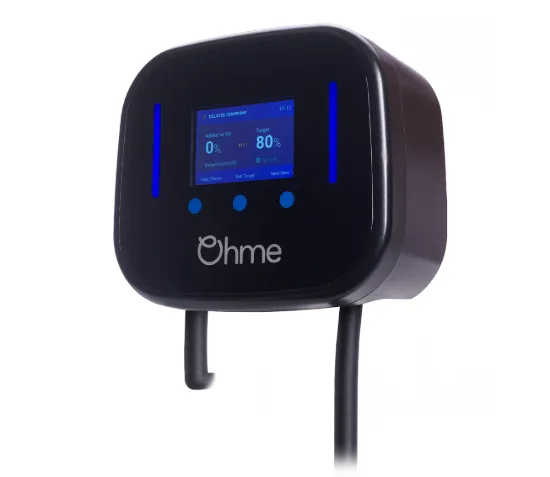
The Ohme Home Pro and Ohme ePod are sensible options where Intelligent Octopus Go control is the main buying priority.
Both are 7.4kW single-phase chargers. The Home Pro has a fixed Type 2 cable and an on-unit display, while the ePod provides a Type 2 socket for customers who prefer to remove the charging lead when it is not in use.
Ohme works differently from most other supported chargers. The charger is connected through the Octopus app, but charging preferences are then managed in the Ohme app. Dynamic Charging should remain active and the Ohme price cap should be switched off when following the current Octopus setup instructions.
| Ohme model | Connection | Best suited to |
|---|---|---|
| Home Pro 5m | Fixed 5m Type 2 cable | Regular home charging where the vehicle parks close to the unit |
| Home Pro 8m | Fixed 8m Type 2 cable | Driveways requiring additional cable reach |
| ePod | Type 2 socket | Customers wanting a smaller socketed charger |
Ohme users should review the Prioritise setting introduced for the six-hour charging allowance. “Prioritise Savings” is intended to keep managed charging within the allowance, while “Prioritise Target” may continue charging at the day rate where more time is needed to reach the requested target.
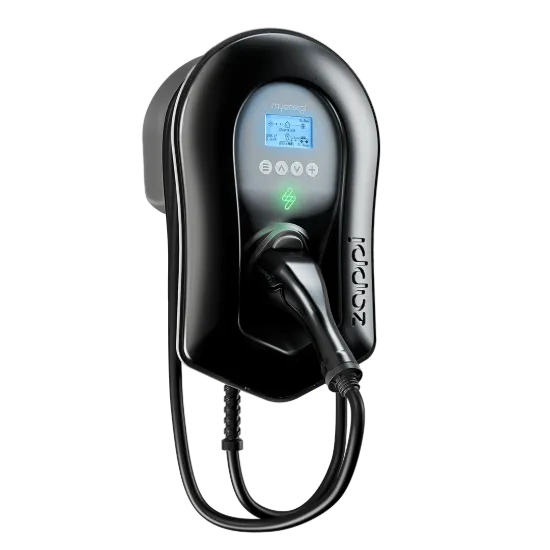
Best fit for flexible solar control: myenergi zappi
The tethered myenergi zappi and untethered zappi suit buyers who want a broad choice of charging modes, solar PV monitoring and single-phase or three-phase hardware.
The standard zappi provides FAST, ECO and ECO+ modes. These allow the charger to use grid electricity, a mixture of grid and measured surplus generation, or wait for sufficient surplus depending on how the system is configured.
Intelligent Octopus Go introduces an important operating caveat. Octopus currently advises customers not to use solar-divert charging settings while its tariff is controlling the vehicle. Buyers can still choose zappi for its hardware, monitoring and future flexibility, but the active operating mode should follow the latest Octopus guidance.
The 22kW option requires a suitable three-phase supply and a vehicle capable of accepting three-phase AC charging. A 22kW nameplate does not mean every vehicle will charge at 22kW.
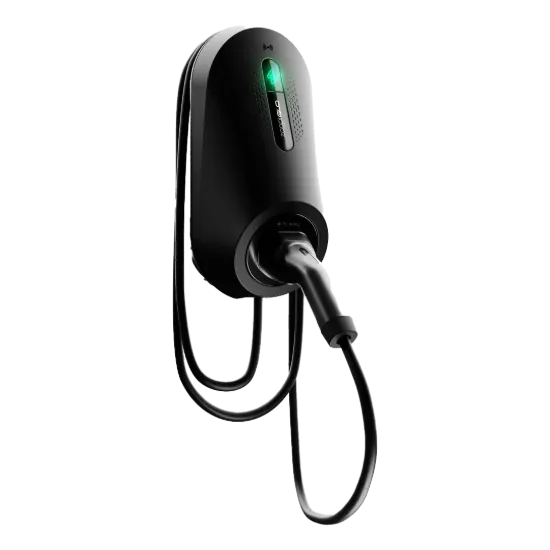
Best compact myenergi option: zappi GLO
The myenergi zappi GLO is a screen-free, 7kW single-phase charger with a 6.5m tethered Type 2 cable.
Control is handled through the myenergi app. It also provides RFID access, which may suit a charger positioned on a shared driveway or somewhere accessible from the road.
myenergi confirms that zappi GLO supports Octopus Intelligent tariffs. As with every model, the exact version should still be selected successfully in the Octopus app before compatibility is treated as confirmed for a project.
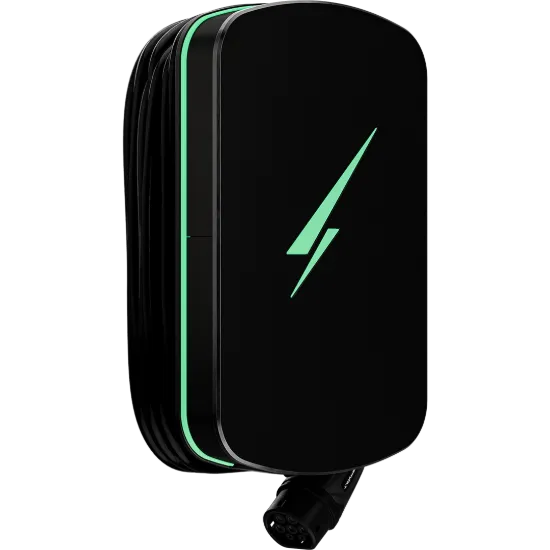
Best fit for a long tethered cable: Hypervolt
The Hypervolt Home 3 Pro is a 7.4kW single-phase tethered charger available with 5m, 7.5m and 10m Type 2 cable options.
This makes it a practical choice where the ideal wall position is some distance from the vehicle’s charging port. Choosing the correct cable length during specification is preferable to relying on an extension arrangement, which should not be used for normal Mode 3 EV charging.
The Home 3 Pro connects directly through the Octopus app. The customer selects Hypervolt and the exact model, signs into the Hypervolt account and authorises Octopus to control the charge point.
Hypervolt also provides solar-related operating modes and a Battery-Safe mode. These may be useful outside tariff-controlled sessions, but settings should be reviewed carefully where Intelligent Octopus Go, solar PV and battery storage are all present.
Available Ultra Black cable options include:
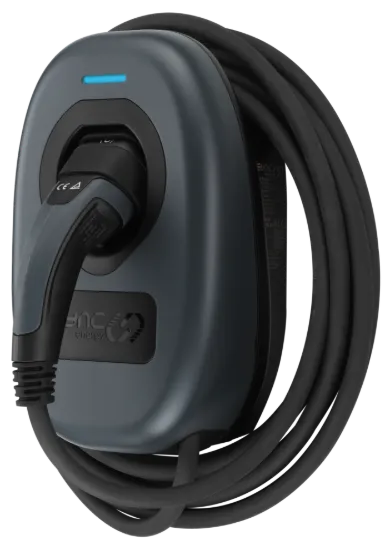
Best fit for a Sync Energy system: Wall Charger 2
The Sync Energy Wall Charger 2 is now an important addition to this guide because Octopus provides a dedicated connection process for Sync Energy chargers.
The Wall Charger 2 is a 7.4kW single-phase charger available in socketed and tethered versions:
It may be a particularly logical choice where the property is also using Sync Energy Flow battery storage, a hybrid inverter or other products from the Sync Energy range.
To connect it, the charger must first be set up and online in the Sync Energy app. The user then opens Devices in the Octopus app, adds an electric vehicle, selects the vehicle and chooses the installed Sync Energy charger model.
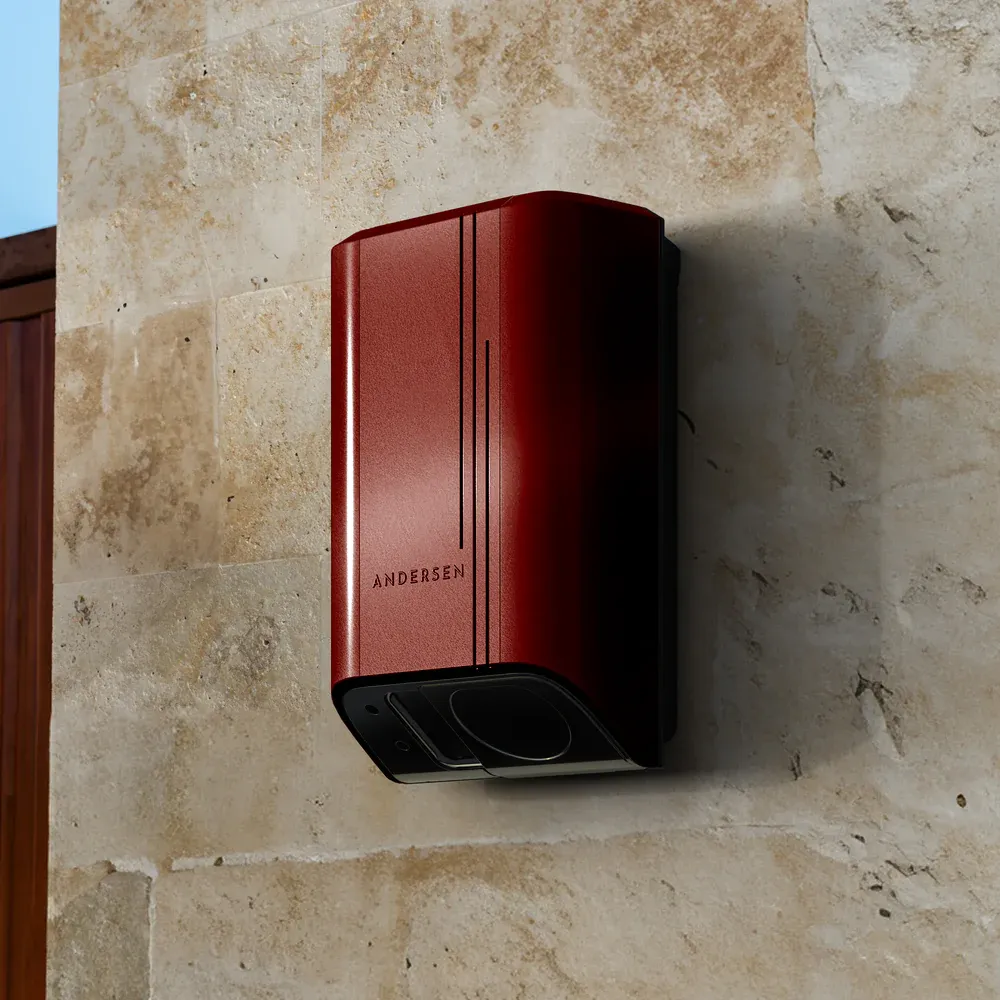
Best fit for design or three-phase: Andersen Quartz
The Andersen Quartz range suits projects where the charger will be highly visible or where a 22kW three-phase option is required.
Quartz is available as a 7kW single-phase or 22kW three-phase unit, with socketed and tethered configurations. Andersen states that all Quartz chargers have been integrated with Intelligent Octopus Go since September 2025.
Relevant LAMPS options include:
- Andersen Quartz 7kW socketed
- Andersen Quartz 7kW tethered with 5.5m cable
- Andersen Quartz 7kW tethered with 8.5m cable
- Andersen Quartz 22kW socketed
- Andersen Quartz 22kW tethered
The Andersen A3 is also listed as compatible. However, installers should not assume that every Andersen product has the same status: the A2 22kW is specifically excluded from current Intelligent Octopus Go compatibility.
How Intelligent Octopus Go charging works
Intelligent Octopus Go connects to an eligible vehicle or charger and schedules charging according to the customer’s ready-by time and requested energy requirement.
Under the tariff terms checked on 22 June 2026:
- The home receives the quoted night rate from 23:30 to 05:30.
- The vehicle can receive up to six hours of managed charging in each 24-hour period.
- Octopus may schedule vehicle charging outside the fixed overnight window.
- Additional managed charging above the six-hour allowance may be charged at the day rate.
- A manual bump or boost charge is charged according to the applicable day-rate rules.
Unit rates vary by region and tariff version. Check the customer’s live Octopus quote rather than publishing or specifying a permanent pence-per-kilowatt-hour figure.
Intelligent Octopus Go with solar and batteries
A charger being “solar compatible” does not mean its solar-divert mode should automatically be enabled while Intelligent Octopus Go is controlling it.
Octopus published revised solar and battery guidance in May 2026. It states that billing is based on electricity imported through the smart meter. Where solar alone charges the car and the property imports nothing, that charging is not billed and does not count towards the six-hour managed charging allowance.
However, Octopus also advises customers to:
- Configure a home battery so that it does not discharge into the EV charger
- Avoid using the charger’s solar-divert setting while Intelligent Octopus Go controls charging
- Review export and charging priorities rather than assuming maximum self-consumption gives the lowest overall cost
This is a significant change from older advice that simply recommended combining daytime solar diversion with overnight Intelligent Octopus Go charging. Installers should agree the intended control hierarchy before commissioning the charger, inverter and battery.
How to connect a charger to Intelligent Octopus Go
The exact screens may change, but the current charger-level process follows these steps:
- Confirm the exact model is supported. Use the live Octopus eligibility checker before purchasing or changing tariff.
- Install and commission the charger. Complete the manufacturer setup and confirm that the unit is online.
- Create the manufacturer account. The Octopus connection normally requires the charger owner’s account credentials.
- Update the charger and app. Install current firmware and use the latest version of both apps.
- Park the vehicle at home. Plug it in but ensure it is not actively charging when the connection test begins.
- Open the Octopus app. Select Devices, Add device and Electric vehicle.
- Select the vehicle. Choose the correct make and model before selecting the charger.
- Select the charger. Choose its manufacturer and exact installed model.
- Authorise the connection. Sign into the manufacturer account and allow Octopus to control the charger.
- Remove conflicting schedules. Disable unnecessary timers in the vehicle or charger unless the manufacturer-specific Octopus instructions require them.
- Set the charging requirement. Enter the ready-by time and amount of energy to add in the app specified for that integration.
Ohme is the main exception to the final step: after connection, charging preferences are managed through the Ohme app rather than the Octopus app.
Checks to make before choosing a charger
Check the exact model, not only the brand
Compatibility applies to individual products and software versions. Andersen is a clear example: Quartz and A3 are compatible, but the A2 22kW is excluded.
Choose tethered or socketed
A tethered charger keeps its cable permanently attached, reducing the time needed to plug in each day. A socketed charger has a cleaner appearance when not in use and allows the cable to be removed or replaced separately.
Measure the cable route
Confirm the position of the charging port on the current vehicle and any likely replacement vehicle. Hypervolt offers up to 10m, while several Ohme, Andersen and zappi options provide different cable lengths or socketed flexibility.
Confirm single-phase or three-phase supply
Most UK homes use a single-phase supply and will normally install a charger around 7kW or 7.4kW. A 22kW charger requires three-phase power, suitable electrical capacity and a vehicle that supports three-phase AC charging.
Survey the internet connection
Direct smart-tariff integration depends on reliable communication. Check Wi-Fi, Ethernet or mobile connectivity at the intended charger position before selecting a model.
Plan load management
The charger circuit, service capacity and other substantial loads must be considered together. Dynamic load management may be required to prevent the property exceeding its configured supply limit.
Plan solar and battery controls
Where the property has solar PV or battery storage, establish which device will measure import and export, where CT clamps will be installed and how battery discharge into the car will be prevented.
Common Intelligent Octopus Go problems
The charger does not appear in the Octopus app
Confirm that the exact model is supported. A charger from a compatible manufacturer may still be absent because it is an older version, a commercial model or a different power rating.
The charger will not connect
Check that the charger is online in its manufacturer app, that the correct account is being used and that firmware is current. The vehicle should be at home, plugged in and not charging during the connection test.
The car ignores the Octopus schedule
Look for an active departure timer or charging schedule in the vehicle. With charger-level integration, a competing vehicle timer can prevent the car from accepting power when Octopus starts a session.
The car charges for more than six hours
Review the requested energy, ready-by time and Charge Cap or manufacturer equivalent. Charging above the six-hour managed allowance may be billed at the day rate.
Ohme users can choose “Prioritise Savings” to limit charging around the allowance or “Prioritise Target” where reaching the requested battery target takes priority.
A home battery discharges into the EV
Review the metering and battery-control configuration. Current Octopus guidance says the home battery should be blinded to the EV charger so that it does not discharge stored energy into the car.
A zappi account has more than one charger
Octopus states that onboarding may fail where more than one zappi is linked to the same myenergi account. One charger may need to be removed from that account during onboarding.
Which Intelligent Octopus Go charger should you buy?
| Main requirement | Charger to consider | Reason |
|---|---|---|
| Tethered tariff-focused charger | Ohme Home Pro | Direct integration with charging preferences managed through Ohme |
| Socketed tariff-focused charger | Ohme ePod | Compact Type 2 socket with Ohme tariff control |
| Solar and three-phase flexibility | myenergi zappi | 7kW and 22kW options with tethered and untethered formats |
| Compact unit with RFID | zappi GLO | Screen-free app control and RFID access |
| Long tethered cable | Hypervolt Home 3 Pro | Choice of 5m, 7.5m or 10m Type 2 lead |
| Sync Energy home system | Sync Energy Wall Charger 2 | Socketed and tethered variants within the Sync Energy range |
| Design choice or 22kW requirement | Andersen Quartz | 7kW and 22kW versions with socketed, tethered and finish options |
Browse compatible EV chargers at LAMPS
LAMPS supplies compatible home EV chargers from Ohme, myenergi, Hypervolt, Sync Energy and Andersen at trade prices through the website.
Browse all home EV chargers, or review the LAMPS EV charger installation service where installation is required.
Check the current product page for price and availability before ordering. For help identifying the correct model for a project, email [email protected] with the vehicle, supply type, preferred cable format and details of any solar PV or battery system.
Intelligent Octopus Go FAQs
Which EV chargers connect directly to Intelligent Octopus Go?
Current compatible ranges available from LAMPS include Ohme Home Pro and ePod, myenergi zappi, Hypervolt Home 3 Pro, Sync Energy Wall Charger 2 and compatible Andersen Quartz and A3 models. Always confirm the exact model in the live Octopus compatibility checker before purchase.
Can any charger work if my car is supported?
A charger without direct Octopus integration may still be used where Octopus connects to a supported vehicle instead. The charger must remain electrically suitable, but smart scheduling is controlled through the vehicle connection rather than the charger.
Is charger integration better than vehicle integration?
Charger integration can be more transferable because changing cars does not necessarily require a new tariff connection. Vehicle integration may be useful with an existing charger, but compatibility depends on continuing to use a supported car and account.
Does a manual overnight schedule count as Intelligent Octopus Go integration?
No. A fixed charger timer can use a known off-peak window, but it does not give Octopus control of the charger. Intelligent Octopus Go requires an active authorised connection to a supported vehicle or charge point.
Should I connect both my car and charger?
Use the eligible integration route selected during setup and avoid overlapping control schedules. Connecting several systems or leaving conflicting vehicle timers active can prevent the charger from following the Octopus schedule correctly.
Does Intelligent Octopus Go still include an overnight window?
Yes. Under the tariff terms checked on 22 June 2026, the fixed home off-peak period runs from 23:30 to 05:30. The vehicle can also be scheduled at other times, subject to the managed charging rules.
How many hours of cheap EV charging are included?
The current fair-use policy provides a maximum of six hours of managed EV charging in each 24-hour period. Additional charging may be billed at the applicable day rate, so users should review their requested charge and Charge Cap settings.
Does the whole house receive the off-peak rate?
Household electricity used from 23:30 to 05:30 receives the quoted night rate. Where Octopus schedules the EV outside that window, the billing treatment for household use follows the current tariff rules for that charging period.
Can Intelligent Octopus Go be used with solar panels?
Yes, but charger solar modes should be configured carefully. Octopus currently advises users not to use solar-divert charging settings while Intelligent Octopus Go manages charging, even where the charger itself supports surplus-solar control.
Can Intelligent Octopus Go be used with a home battery?
Yes. Octopus currently advises that the battery should be blinded to the EV charger so it does not discharge into the car. Battery schedules, charger settings and CT measurement should be reviewed as one system.
Is the Andersen A2 compatible with Intelligent Octopus Go?
The Andersen A2 7kW may be compatible depending on its age and exact model. The Andersen A2 22kW is specifically excluded from current Intelligent Octopus Go compatibility, so it should not be specified for direct tariff integration.
Where do Ohme users set their charge schedule?
Ohme is connected through the Octopus app, but the charging preferences are managed in the Ohme app. Dynamic Charging should be active and the Ohme price cap should be disabled in accordance with the current Octopus instructions.
Do I need a smart meter for Intelligent Octopus Go?
Yes. Intelligent Octopus Go relies on a compatible smart meter capable of supplying the required half-hourly usage data, along with an eligible vehicle or charger and the Octopus Energy app.
Official compatibility sources
- Intelligent Octopus Go eligibility and current tariff information
- Octopus smart tariff terms and conditions
- Octopus Charge Cap, solar and battery guidance
- Official Ohme connection instructions
- Official zappi connection instructions
- Official Hypervolt connection instructions
- Official Sync Energy connection instructions
Compatibility, tariff rules and software behaviour can change. Confirm the exact charger and vehicle in the live Octopus Energy checker and use the latest manufacturer instructions before specifying or commissioning a system.